
Sources, pages, keywords and locations
These Analytics cards show where your sales and visitors came from, and they follow its date range.
Where sales came from
Section titled “Where sales came from”This table shows the sources that brought your sales, sorted by sales. A source is the place a shopper came from, such as Instagram or Google.
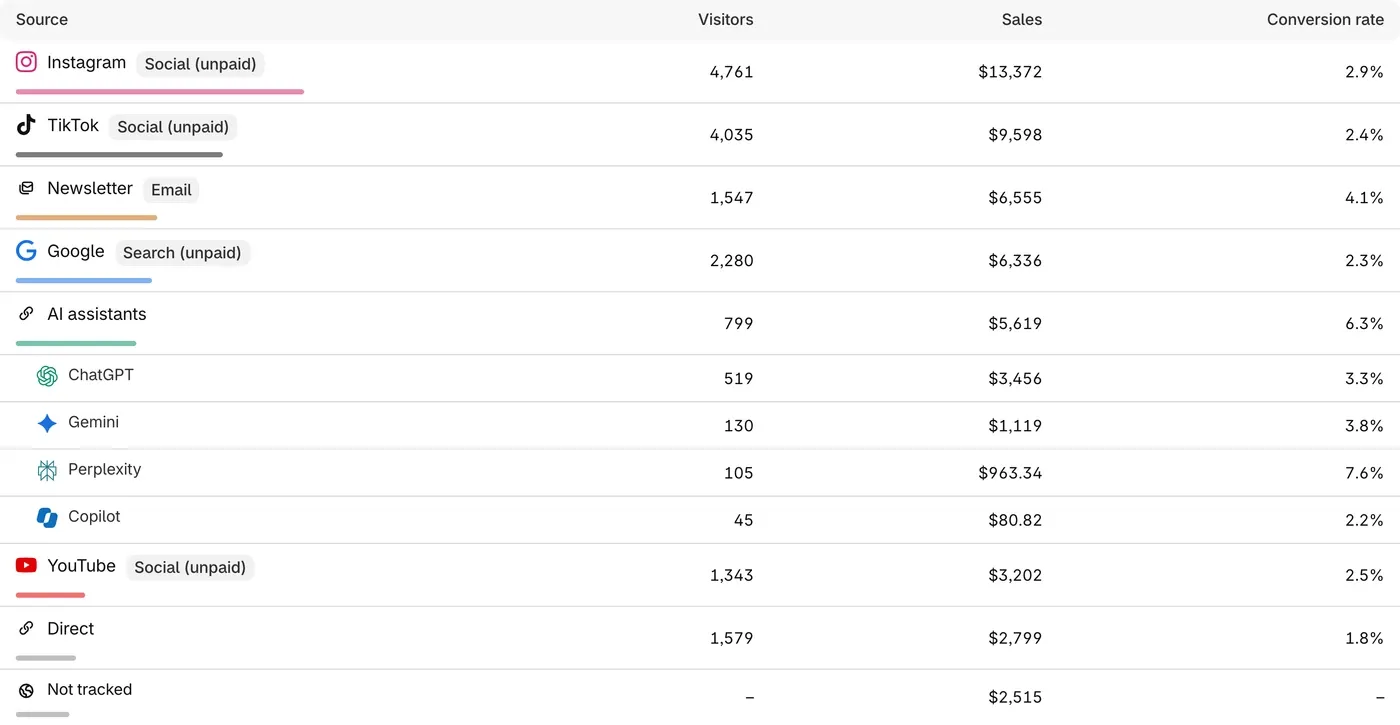
The Not tracked row shows orders with no source.
To choose which visit gets the sale in this table:
-
Make sure the card says Show: Sources.
-
Click Credit: Last visit, then choose Last visit or First visit.
Use First visit to see which sources introduce people to your store. Use Last visit, the default, to see what brought them back to buy.
The Show button can also list Campaigns, Posts and ads, Keywords and Referring pages. The first three fill in from tags, small labels added to the end of a link. See Track paid ads.
Pages, Locations and Devices
Section titled “Pages, Locations and Devices”Click the Show button on each card to change what it lists.
- Pages: Landing pages, All pages or Exit pages. In All pages, a sale counts under every page the buyer viewed, so rows can add up to more than Sales.
- Locations: Country, Region or City, based on visitors’ approximate location.
- Devices: Device type, Browser or Operating system.
You can click most rows to filter the whole Analytics page by them.
Channel names
Section titled “Channel names”A channel is a group of similar sources.
- Social (unpaid): visits from social apps such as Instagram and TikTok, not from ads.
- Search (unpaid): visits from search engines such as Google and Bing, not from ads.
- AI assistants: visits from AI chat apps such as ChatGPT and Gemini.
- Email: visits from email apps, and links tagged as email or newsletter.
- Paid ads: visits from ads, known from ad tags or from the click code an ad platform adds to its links.
- Other websites: visits from any other site, and tagged links that fit no other channel.
- Direct: ThanksTo saw no link, such as someone typing your address.
- Discount code: orders credited by a creator’s discount code alone.
- Survey: orders credited by a survey answer that names no known source.
- Repeat customer: orders credited through the customer’s last order that had a creator.
- Not tracked: orders with no link or source, usually because the shopper declined tracking.
If something looks wrong
Section titled “If something looks wrong”- A table adds up to less than Sales. Orders with no tracked visit aren’t in some tables. A line above the table says so.
- Meta ads show under Social (unpaid). Without the tags, Meta ads look like normal Facebook or Instagram visits. See Track paid ads.
Fix a problem has more help.