
Read a creator's page
Read one creator’s numbers.
-
Open Creators and click the creator’s name.
-
Use the date range at the top of the page to choose a period.
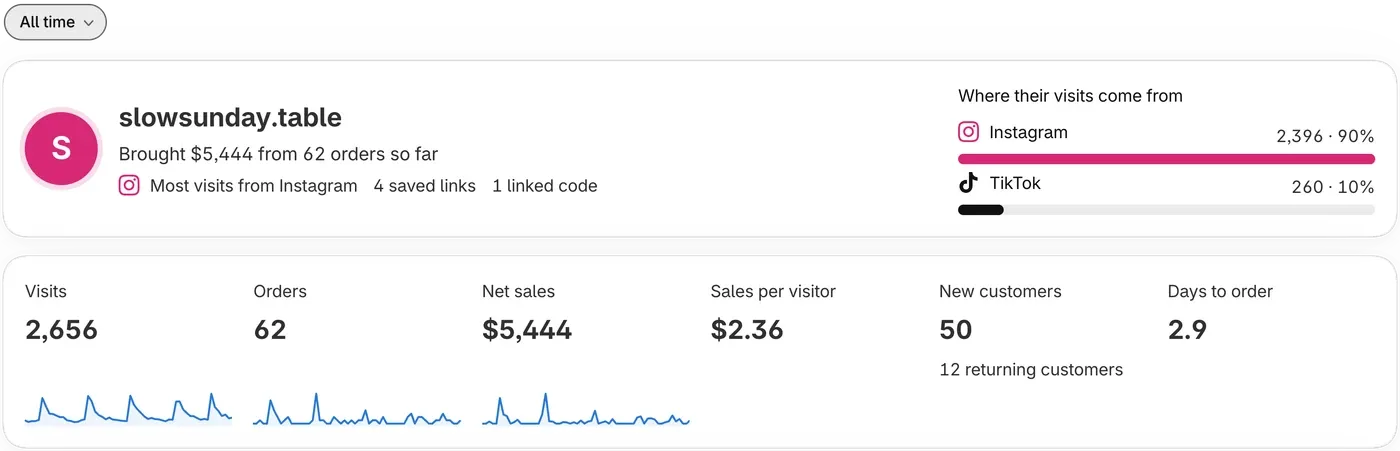
What the tiles mean
Section titled “What the tiles mean”- Orders: orders credited to them. Cancelled orders, orders refunded in full and orders over your plan’s limit are left out.
- Net sales: order totals after refunds, with tax and shipping included.
- Sales per visitor: net sales divided by the people who came through their links.
- Days to order: average days from a shopper’s earliest visit to their order.
Orders also counts orders from discount codes, so it can be higher than Visits. When that happens, or when there are no visits, Sales per visitor shows –.
Links and exports
Section titled “Links and exports”- A link showing
–has the same tracking details and page as another link. Give each link its own Post name. - Orders from a discount code, Shopify’s data or a deleted link aren’t listed in the Links table, so its rows can add up to less than the Orders tile.
- Export orders downloads a CSV (spreadsheet) file of this creator’s orders. Credit is an estimate, so check the orders before you pay anyone from this file. ThanksTo doesn’t pay anyone.
Delete a link or remove a creator
Section titled “Delete a link or remove a creator”- Delete takes a link off the list, but shoppers can still use it, and its visits and orders are still credited to the creator.
- Remove creator (top of the page) deletes their saved links and turns off their stats link. Links they already posted still credit them, and so do their discount codes until you unlink or move each code.